AI and the Rise of Homegrown Software
August 27, 2026
Homegrown software is on the rise. By homegrown software, I mean applications built first for the person making them, shaped through daily use, and deliberately narrower than commercial alternatives.
AI-assisted development is a major reason. It has shortened the distance between an idea and a working tool, changing the economics of software built for an audience of one.
For years, the practical answer to almost every software need was to find an existing product and adapt your workflow around it. Building your own mail client, music player, editor tool, or browser extension required too much time to justify. Even a relatively small application involved learning unfamiliar APIs, setting up infrastructure, debugging platform-specific behavior, and polishing dozens of details before it became useful.
That calculation is changing. Mature frameworks, accessible platform APIs, open-source libraries, and simpler distribution all help, but AI-assisted development has made it practical for individual developers to build software around their own needs.
I see this pattern in tools I have built for myself: a mail app shaped around my inbox habits, a focused Spotify player and widget for my Mac, and editor and browser extensions that address small, repeated frustrations. They differ in size, but they all started from the same thought:
Why keep adapting to software when I can adapt the software to me?
The Economics of Personal Software Have Changed
Personal software used to be expensive in a currency more limited than money: time.
A developer might know exactly what they wanted but still decide against building it. The desired feature could take a day, while learning the framework, understanding the platform, handling edge cases, and creating a usable interface could take weeks. Paying for an existing product was usually the rational choice, even if it only partly solved the problem.
AI does not remove that work, but it changes its cost.
It can explain an unfamiliar API, generate repetitive implementation, help trace a bug across several files, compare possible architectures, or turn an idea into a prototype quickly enough to evaluate it. Instead of spending most of the available time getting started, a developer can spend more of it deciding how the tool should behave.
That distinction matters. The value is not simply that code can be produced faster. It is that small, personal ideas are becoming economical to pursue.
A feature does not need to support a business. An app does not need to address a large market. A tool that saves one person a few minutes every day can be worth building when the cost of building it is low enough.
AI-Assisted Development Is Not Software Made by a Prompt
It is tempting to describe this shift as asking AI to build an app. That misses the important part.
Perhaps, in time, creating an app will feel as casual as Captain Picard walking up to a Star Trek replicator and saying, “Tea, Earl Grey, hot.” Describe what you want, wait a moment, and there it is. We are not quite at the software-replicator stage yet.
AI can help implement software, but it does not know which compromises will become irritating after three months of daily use. It does not know which feature belongs in the product and which one will make the interface worse. It cannot decide how much complexity is acceptable or whether a technically correct result actually feels good.
The developer still has to understand the problem, make product decisions, inspect the code, test real behavior, and maintain the result. Platform permissions, security, data storage, accessibility, performance, and distribution do not disappear because some of the implementation was generated.
Homegrown software works because the developer is also the user. The feedback loop is unusually direct. There is no research report separating the problem from the person solving it. If something feels slow, confusing, or unnecessary, the person who can change it encounters that problem during normal use.
AI accelerates the loop. It does not replace it.
Posta as an Example: An Inbox Built Around Personal Priorities
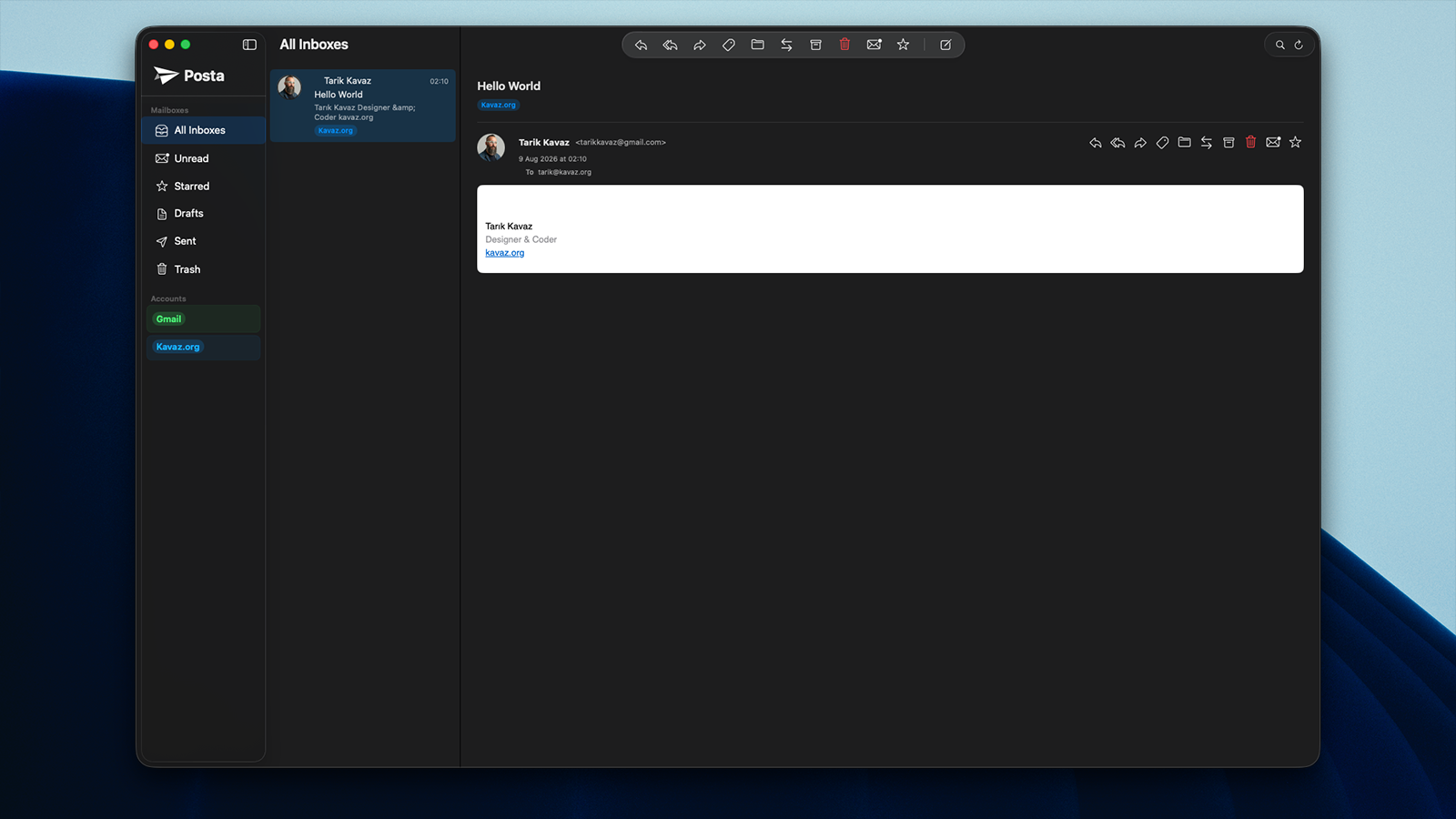
One example from my own work is Posta. It began with a familiar frustration: I use email throughout the day, but every available client reflected somebody else's idea of how email should work.
The particular features are less important here than the pattern behind them. I wanted a native macOS client focused on the services and routines I already use, including small preferences that would be unlikely to shape a commercial product's roadmap. One was keeping an account available without including it in the unified inbox or its badge count.
That last feature is a good example of why homegrown software is valuable. It might not be prominent enough to drive the roadmap of a commercial mail client, but it makes a meaningful difference to my daily experience.
Posta is not an argument that everyone needs another mail client. It is an example of how a narrowly scoped app can make sense when its developer is also its primary user. Its narrowness is not a limitation waiting to be corrected. It is the point of the exercise.
Cue as an Example: Reshaping an Existing Service
Another example is Cue, which came from a similar impulse applied to music.
Spotify already provides a complete application, but that does not mean its interface is ideal for every moment. Sometimes I want music to be present on the desktop through a focused player and widget, with the information and controls I care about available without bringing the full Spotify interface forward.
I used Cue to explore what that smaller, desktop-specific experience could look like.
This is another form of homegrown software. It does not have to replace the service underneath it. It can create a better personal interface around that service. The underlying platform continues to handle the music catalogue and playback, while a personal app shapes how I interact with it on my Mac. The point is not that everyone needs Cue, but that an existing service can support a more individual interface around it.
Commercial products are usually designed around the widest useful audience. A personal app can be designed around a particular desktop, routine, and preference. That allows it to be smaller without feeling incomplete.
Extensions: Fixing Friction Where It Happens
Not every problem needs a standalone application. Some of the most useful homegrown tools are extensions that change an existing environment.
I spend much of my working day in Cursor, so small inefficiencies there become visible quickly. In my case, those irritations led to experiments such as Open Files Externally, Typedown, Workspace To-do's, and the .K Material theme. They cover different details, from opening a file in another desktop app to keeping project notes near the project, but they are examples of the same approach: changing a familiar environment at the point where it causes friction.
Search Shortcuts, a Chrome extension, came from another repeated annoyance: selecting text and then taking several steps to search for it on a particular site. It is another small example, not a proposal for a new browsing platform.
None of these ideas needs to become a large product. Their value comes from removing friction exactly where it occurs.
This is one reason extensions are such a natural part of the homegrown software movement. They let developers modify the tools they already use instead of rebuilding entire platforms. A small extension can make an established application feel personal.
Narrow Scope Is a Feature
Commercial software has pressures that personal software does not.
It needs to attract customers, support different workflows, explain its value on a pricing page, and compete through feature lists. As the audience grows, so does the number of reasonable requests. The product becomes broader because it has to accommodate more people.
Homegrown software can begin from the opposite direction.
A personal mail client can focus on one provider. A music utility can focus on one person's desktop habits. An editor extension can solve one specific interruption without becoming a complete productivity platform.
The absence of unnecessary features reduces more than visual clutter. It means fewer settings, fewer interactions between unrelated systems, and fewer decisions imposed on the user. It also makes the software easier for one developer to understand and maintain.
The goal is not to create a smaller version of every commercial product. It is to identify the exact part of a problem that matters and build around it.
Ownership Has a Cost
Homegrown software is not free just because it avoids a subscription.
The developer becomes the product team, support department, security reviewer, and maintenance plan. APIs change. Operating systems introduce new restrictions. Authentication expires. Browser and editor platforms update their extension models. A tool that handles email or account credentials carries responsibilities that a weekend prototype does not.
This approach therefore works best when the scope is sensible and the developer is willing to own the result.
There are also many cases where buying software remains the better decision. Services that depend on large-scale infrastructure, collaboration, specialist expertise, regulatory compliance, or continuous support are rarely sensible to recreate for personal use. A good subscription can provide far more value than it costs.
The change is that buying is no longer the automatic answer. Building has become a realistic option again.
From Personal Tool to Shared Product
A homegrown application may remain personal, and that is a valid outcome. Software does not have to become a startup to justify its existence.
But personal use can also be a strong starting point for a public product. When the developer uses the tool every day, the earliest feedback is continuous and honest. Features are tested against real work instead of hypothetical personas. Rough edges become difficult to ignore.
If other people share the same problem, the software can grow outward from a solid centre. The tools I have mentioned began with my own needs, but those needs are not necessarily unique. Their personal origins give them a clear opinion before a broader audience starts influencing them.
The challenge is preserving that clarity as the audience grows.
Software That Fits the Person Using It
The most interesting effect of AI-assisted development may not be that companies can produce more software. It may be that individuals can produce smaller software.
A mail app can reflect one person's inbox priorities. A music widget can fit one desktop. An editor extension can remove a particular interruption. A browser extension can compress a repeated sequence into a single action.
These tools do not need to change an industry. They only need to improve the work and routines they were built around.
The apps and extensions I have mentioned are simply my examples of that shift. AI helped make them practical, but their value does not come from the amount of code produced or the speed at which it was written. It comes from deciding what I wanted my software to do, using it, noticing where it failed, and changing it.
That is why homegrown software is on the rise. We can increasingly build tools that fit the person using them, instead of always asking the person to fit the tool.