My AI Workstation: Claude Code, Codex and infiniterm (Cursor Is Gone)
November 14, 2026
For most of this year I paid for three AI coding tools: Claude Code, Codex and Cursor. I used all three, often on the same project, and I wired them to the same memory so they could hand work to each other (I wrote about that in Using Obsidian as Long-Term Memory for Claude, Codex and Cursor).
This week I deleted Cursor. Here is why, what replaced it, and how the way I work with agents has changed.
Why I deleted Cursor
When I looked at how I actually used Cursor, the AI part was the smallest part. The agent work happened in the terminal, with Claude Code and Codex. Cursor had become an editor I opened to read a diff or fix a line by hand.
For that job I do not need an AI editor. I need a good editor, and the one I know best is VS Code. Cursor is a fork of it, so going back cost me nothing: the same keybindings, the same extensions, the same muscle memory. My VS Code theme and extensions were still there, waiting.
It also cut my AI bill
Three subscriptions for overlapping work is hard to justify. Two agents cover everything I did with three, and I removed one monthly payment without losing anything I used.
The lesson is simple: audit your tools by what you do with them, not by what they can do. Cursor can do a lot. I was using it as a text editor.
Two agents, one workflow
Claude Code and Codex are different enough that I keep both. I run them side by side, give them separate tasks, and sometimes let one review what the other wrote. A second opinion from a different model catches things the first one is blind to.
Because both read the same rules file and the same Obsidian vault, switching between them is cheap. A handoff note written by one is picked up by the other in the next session.
More and more vibe coded
The bigger change is not which tools I use. It is how much I let them do.
A year ago I wrote most of the code and asked the AI for help with parts of it. Now it is often the other way around. Some things are vibe coded end to end: small tools, scripts, landing pages, one-off utilities. My job there is oversight. I describe what I want, read what comes back, test it, and steer.
That does not mean I stopped caring about the code. It means my effort moved:
- Less typing, more reviewing.
- Less "how do I write this", more "is this the right thing to build".
- Clear rules and good context matter more than ever, because the agent follows them on every task.
For production work and client projects I still read every diff. For a script I will run once, I care that it works and that it does not do anything dangerous.
infiniterm: my workstation
Running several agents at once has a practical problem: you lose track of them. One is waiting for your approval, another finished ten minutes ago, a third is stuck on a failing test, and they are all hidden behind tabs.
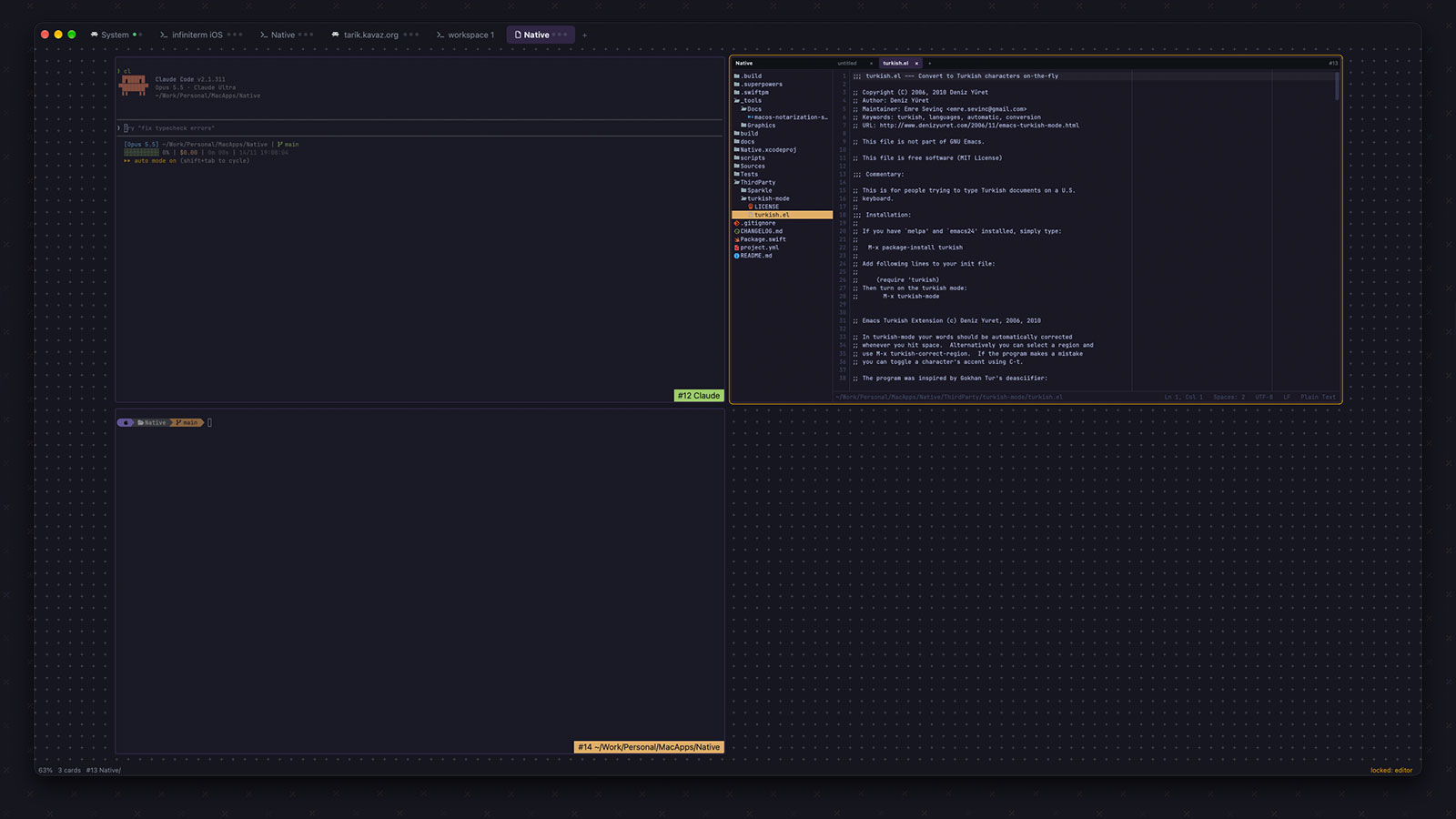
infiniterm solves this, and it has become the app I live in. Its tagline sums it up: "See which agent needs you without opening a single tab."
It is a native macOS terminal (Apple Silicon, written in Rust, no Electron, no account, no telemetry) that puts every terminal on one zoomable canvas instead of in tabs. Each terminal is a card, each card keeps its place, and you zoom out to see everything or zoom in to work in one.
The part that makes it an agent workstation is the card border. It shows what the agent inside is doing:
- Violet: working.
- Yellow: waiting on you.
- Red: failed.
- Green: done, and it turns grey once you have looked at it.
There are no notifications and nothing steals focus. I glance at the canvas and I know which agent needs me. It works with Claude Code, Codex, OpenCode, Pi, Cursor and Antigravity. Each agent reports its state through hooks you install once, for example:
ift install-claude-hooks
ift install-codex-hooksPlain zsh commands report their status too, so a long build or test run gets the same colored border.
A few other things I use every day:
- Shells survive restarts. They run in a small daemon, so quitting, updating or a crash does not kill a running agent.
- The
iftCLI drives other cards.ift ls --agentslists agent cards with the session id thatclaude --resumetakes, andift send 7 "npm test" --entertypes into another card. - More than terminals. There are editor cards,
ift diffcards againstHEAD, Markdown page cards, and browser cards. - Remote machines.
ift connect user@hostopens a window whose cards run on a server over SSH. - Shortcuts.
Cmd 2fits every card on screen,Cmd 1fits the focused one,Ctrl Tabcycles through recent cards.
infiniterm is free for personal use, with every feature included. Commercial use is a one-time $29 per person, on the honor system, with a 30-day trial at work. You can install it with Homebrew:
brew install --cask ekinertac/tap/infinitermI liked it enough to write a Raycast extension for it.
An iOS app is also on the way. It is almost ready to publish, and you can try it now through TestFlight. If you do, I would love your feedback: what works, what breaks, and what you miss. You can send it straight from the TestFlight app. I wrote more about the iPhone app and how its notifications work in infiniterm for iPhone.
Where this leaves me
My setup is smaller than it was a month ago, and it does more:
- Claude Code and Codex for the work.
- VS Code when I want to read or edit by hand.
- Obsidian as shared memory between agents.
- infiniterm as the place where all of it runs, in one view.
Fewer tools, a lower bill, and more of my time spent deciding what to build instead of typing it.