infiniterm for iPhone: Answering My Agents Away From the Desk
November 14, 2026
In My AI Workstation I described how infiniterm became the place where my agents run, and I ended with a line about an iOS app being on the way. This post is about that app, and about the small service that makes its notifications work.
First, credit where it belongs. infiniterm is Ekin Ertaç's app. I use it every
day and I contribute to it, but the Mac app, its canvas and its ift CLI are
his work. What I built is the iPhone companion, infiniterm for iOS, and a push
relay called infiniterm-push.
Both are tools I made for myself. Anyone can use them, and I am not trying to make money from them. They are the kind of software I wrote about in the homegrown software post.
Why a phone app
The colored card borders in infiniterm solve the "which agent needs me" problem, as long as I am looking at the Mac. The moment I walk away, the problem comes back in a worse form. Claude Code asks for permission to run a command, nobody answers, and the agent sits idle for an hour.
Most of those questions take a second to answer. "Yes", "No", pick option 2, or a short sentence of direction. I did not need a remote desktop for that. I needed to see the card that is waiting and type a reply into it.
How it connects
The app is an ssh client. It reaches the Mac through Tailscale and the Mac's
own ssh server, then runs ift proxy join, which speaks the same protocol
infiniterm uses to share its canvas and sessions. The phone is a viewer of
what is already on the Mac, not a second way in.
There is no account and no pairing server. You add a Mac in one of two ways:
- Scan a QR code. On the Mac, run
ift phone add <device name>. It makes a key for the phone, limits that key to infiniterm's own commands, and prints a QR code. Scan it once and the phone connects. The Mac's host key is pinned at the same time. - By hand. Enter the address and add the phone's public key to the Mac yourself.
ift phone add is part of infiniterm itself, so it depends on the Mac side
that Ekin ships.
What it does
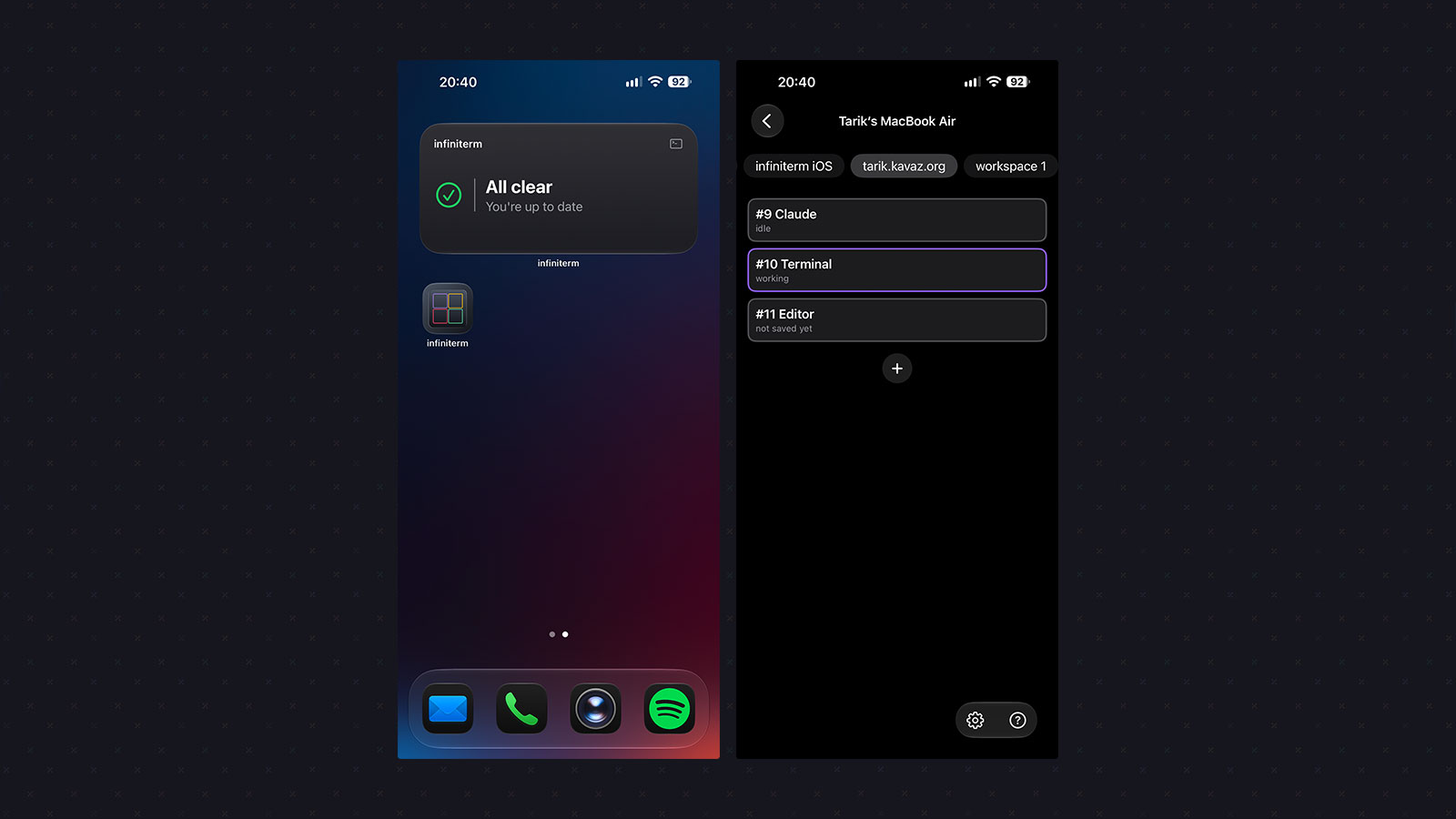
The main screen lists the Mac's workspaces and cards with their agent state, in the same colors as the Mac. Each workspace tab shows how many cards are waiting, and there is a "needs you" list across all workspaces. You can pick how the cards look (boxes, pills or a list), swipe between workspaces, and switch to a canvas view that shows the Mac's layout and lets you move cards on it.
Open a terminal card and you get its output, its history above the live screen, and a keyboard with a toolbar of keys a phone keyboard does not have: Tab, Esc, an arrow pad, Control keys, paste and more. You choose which keys are on it and in what order.
Answering an agent is the part I spent the most time on:
- A Yes and No bar appears while a card is waiting.
- A button per option when the agent shows a numbered menu.
- Snippets, grouped and with recent ones first, for the prompts I send often. A Shortcuts action can send a snippet to a card too.
- Multi-line replies are sent the way Claude Code expects, so a reply with line breaks does not turn into a stray paste.
It is not only terminals any more. File and editor cards open read-only, with
syntax colors and a diff against HEAD, so I can see what an agent changed.
Markdown pages render properly, which matters for the plans and specs agents
write. Transcript cards show a session's turns. And "Send to card" quotes
selected lines from a file or a diff hunk straight into an agent's prompt.
A few more pieces:
- An in-app browser for pages the Mac serves on its own localhost, through the same ssh connection, so I can look at a dev server an agent just started. It reaches nothing else.
- Mac updates. A badge shows when the Mac's infiniterm is behind the newest release, and the phone can start the update.
- Workspace and card management. Create, rename and close workspaces and cards from a long press.
- An optional Face ID lock, off by default.
- English and Turkish, for the whole app.
Notifications, and why they need a relay
While the app is open, it watches the canvas and notices when a card changes state. When the app is in the background or closed, it cannot: it drops its ssh connections and reconnects when it comes back. Something else has to wake the phone.
That something is Apple's push service, and sending through it needs a private key. I did not want that key inside the Mac app or the phone app, where anyone could pull it out. So the key lives in a small relay, infiniterm-push, which is a Cloudflare Worker and the only server in the setup.
At a high level, it works like this:
- When you turn on "Notify when the app is closed", the phone registers with the relay and gets a random id.
- The phone gives that id to each of your Macs over ssh. infiniterm (from 0.6.11) has the commands for this, again on Ekin's side.
- When a card on the Mac starts waiting, fails or finishes, the Mac tells the relay, and the relay sends the push to the phone.
- The phone shows a banner in its own language, updates the badge, and opens the right card when you tap it.
There is also an Attention widget for the home screen and the lock screen, which lists the cards that need you. To keep it current with the app closed, the relay holds the last card list for each device for up to 24 hours, and deletes it when you turn notifications off. Reading that list takes a second key that only the phone has, so one of your Macs cannot read what another one sent.
I want to be plain about the trade-off: the relay sees card and workspace names in transit and stores them for up to 24 hours. There is no end-to-end encryption yet. Notifications are off by default, and the rest of the app works without them.
One detail worth knowing: the Mac sends nothing while the infiniterm window is in front, because then you can already see the borders.
Trying it
The app is on TestFlight, and build 3 was approved for external testing this week. You can join through the TestFlight link. It is not on the App Store yet.
You need an iPhone on iOS 17 or later, a Mac running infiniterm that you can reach over ssh (Tailscale makes this easy), and infiniterm 0.6.11 or later if you want notifications. If you do not have infiniterm yet, start at infiniterm.app.
If you try it, I would love your feedback: what works, what breaks, and what you miss. Take a screenshot and send it straight from the TestFlight app.
Where this leaves me
I still do my real work at the desk, in infiniterm on the Mac. The phone app does not replace that. It covers the gaps: the walk to the kitchen, the meeting that runs long, the evening when an agent hits a question five minutes after I stood up.
The agents keep working, and I keep answering them, wherever I am.